AI CLIPPING · LONG VIDEO → VERTICAL CLIPS
AI clip maker.
Ready-to-post clips.
Paste a podcast, interview or any long video: ClipFlap's AI clipping finds the moments worth posting, cuts them into short vertical clips on full sentences and captions them in the original language. Review, adjust, publish.
REAL CLIP, UNEDITED
Watch this clip in full →THE FILM · 37 S
Paste. Clip. Clean. Schedule. Posted.
One episode, start to finish — real clips, real calendar, sound on.
TITLES WRITTEN BY CLIPFLAP DURING OUR TESTS — NONE ARE MADE UP
- CAPTION LANGUAGES
- 24
- MAX SOURCE FILE
- 8 GB
- CLIP RESOLUTION
- 1080×1920
- FORMATS · 9:16 · 1:1 · 16:9
- 3
STRAIGHT OUT OF CLIPFLAP
Zero editing. Vertical clips exactly as they come out.
Your video's language, detected and respected.
ClipFlap aims to preserve Arabic dialects as spoken instead of rewriting them into Standard Arabic; review names and locally specific words before publishing. The language is detected when you paste the link and can be changed in one click.
HOW IT WORKS
From long video to short clips, no editing
01T+0:00
Paste a link
YouTube, Google Drive or a file up to 8 GB. Transcription starts right away.
02MEANWHILE
The AI calls action
Highlights, framing shot by shot, silences cut, karaoke synced to the voice, clip score.
03TIME VARIES
Review and publish
Scored, captioned 1080×1920 clips ready to review for TikTok, Reels and Shorts.
WHAT IT IS
What is an AI clip maker?
An AI clip maker (AI clipping, also called AI video clipping) is software that automatically turns a long video — a podcast, an interview, a livestream, a talk — into short, vertical, subtitled clips ready for TikTok, Reels and Shorts, without an editor cutting them by hand. The software transcribes the recording, finds the moments that stand on their own, cuts them on complete sentences, reframes the picture around whoever is speaking and burns the captions into the video.
ClipFlap does this from one link, in the language the video was recorded in: 24 caption languages, a stacked split screen for two-voice conversations, and every clip scored so you know which to post first. The output is the finished clip, not a timeline to keep editing.
Explore the AI podcast clip generator →GUIDES
AI clipping guides, by source and use case
One page per job, with the real workflow, the review step and the limits that still apply. Read the one that matches your videos before you paste a link.
- AI clip maker for any long videoThe AI clip maker workflow: podcasts, interviews, streams and talks cut into short vertical clips on complete sentences, reviewed before publishing.
- AI clip generator from a YouTube linkPaste a YouTube link and generate captioned vertical clips from the best moments, free to try, no download or timeline.
- YouTube clip maker: clip a video from its linkClip a YouTube video into vertical Shorts from the link: transcript-led moments, sentence boundaries, captions burned in, nothing to download.
- AI stream clipper for Twitch and YouTube streamsWebcam on top, gameplay below: how a stream replay becomes vertical clips with the webcam frame measured on the image and the HUD cropped out.
- AI podcast clip generatorTurn a filmed episode into captioned vertical clips. Preview real output, choose your input range and review each clip before downloading.
- Podcast to clips: long episode to vertical clipsPodcast to clips, step by step: one filmed episode into vertical clips for TikTok, Reels and Shorts, without re-editing per network.
- Podcast to YouTube Shorts with AIPodcast to Shorts under a minute: how a long episode is cut, reframed to 9:16 and captioned for YouTube.
- Split-screen clips for two-voice podcastsSplit screen for two-voice podcasts: when the stacked composition keeps both people visible instead of a jumpy crop.
- Darija subtitles for Moroccan podcastsDarija subtitles for Moroccan podcasts: Arabic kept as spoken, rendered right-to-left, reviewed before publishing.
- Opus Clip alternative for French and ArabicAn Opus Clip alternative for French, Arabic and two-voice podcasts: a checklist to compare outputs on your own footage.
THE BUILT-IN EDITOR
Publishable as is,
not “almost done”
The pacing, the thumbnail, the caption, the score — everything you used to finish by hand is already done.
YouTube Shorts, TikTok and Reels in one click, from the results page
- Silences trimmed
- Gaps over 1 s fall away in the edit.
- Keywords highlighted
- The words that carry the clip stand out.
- Detailed clip score
- Five axes, out of 100, with a verdict.
- Caption + hashtags
- Ready to paste under every clip.
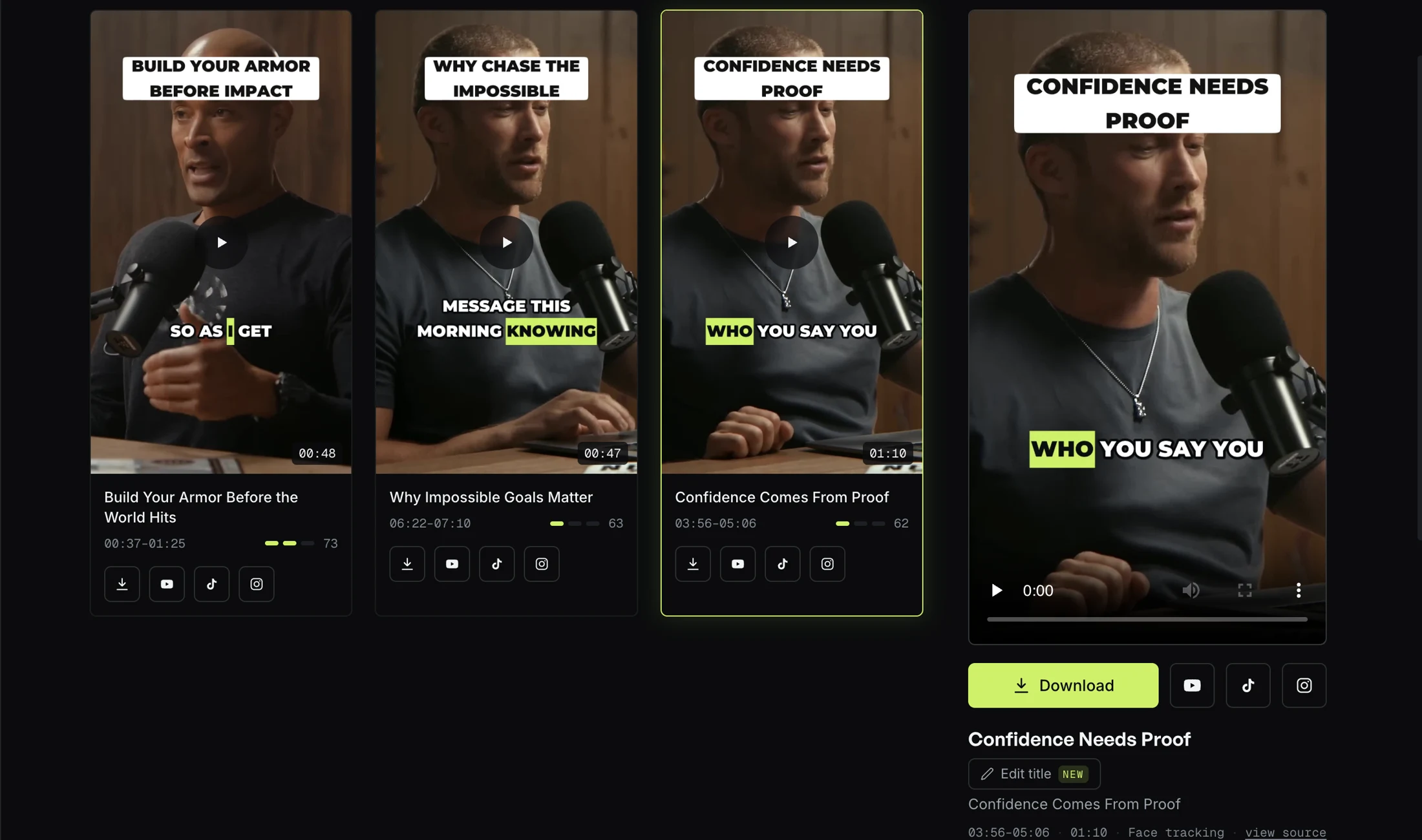
A workshop, not a black box
Every clip arrives with its thumbnail, score, caption and word-by-word transcript. Download, adjust — or publish straight away.
CAPTIONS THAT RESPECT THE LANGUAGE
Subtitled captions engineered per language
- Word-by-word karaoke aims to follow the voice; review the timing before publishing.
- French: non-breaking spaces before « ! ? : ; », elisions handled.
- Arabic: proper right-to-left rendering, connected letters, a real Arabic typeface.
- Key words highlighted automatically. Ten styles, from sober to punchy.
COMPARE ON YOUR OWN FOOTAGE
What to check in an AI clip maker
Run the same source through the tools you are considering. Compare the exported clips and current plan terms, not just feature lists.
Captions
CHECKTest your language
CLIPFLAP24 source languages; review before posting
Pricing
CHECKCheck included input minutes
CLIPFLAP1 processing minute = 1 source-video minute
Exports
CHECKCheck paid watermark policy
CLIPFLAPNo watermark on paid plans
PRICING
Choose the plan that fits your content.
Two subscriptions and a pay-as-you-go option, all counted in processing minutes. Your usage stays the same however many clips you generate.
1 processing minute = 1 minute of uploaded source video. A 60-minute podcast uses 60 processing minutes. See how your minutes are calculated →
Choose how you pay
Monthly billing: pay each month. Your included processing minutes renew every month.
Calculate how many video minutes you need
We help you choose the plan that fits your needs.
4 videos × 60 min = 240 minutes of video to process per month
ESTIMATED COST
You want to process 240 minutes of video per month
Pro lets you process 350 minutes per month · 110 minutes of headroom
≈ $20/ month
SUBSCRIPTION PLANS
Starter
For solo creators getting started.
$10/ month$15
Billed monthly · cancel anytime
150 processing minutes included
≈ 2.5 hours of source video per month
- 1 connected social account
- No watermark
- Extra usage: $0.20/min
Founding price: keep your launch price for as long as your subscription stays active.
Pro
More processing minutesFor creators processing more episodes.
$20/ month$30
Billed monthly · cancel anytime
350 processing minutes included
≈ 5.8 hours of source video per month
- 3 connected social accounts
- No watermark
- Extra usage: $0.20/min
Founding price: keep your launch price for as long as your subscription stays active.
+ applicable VAT · Plan limits: maximum processing capacity 2,000 min/month
PREFER NO SUBSCRIPTION?
Need more minutes?+
Add extra processing anytime at $0.20/min. Wallet deposits start at $20 and never expire.
Your included plan minutes are used first; extra usage is then deducted from your wallet.
Jobs that fail because of ClipFlap are credited back automatically. Every account can process up to 2000 minutes a month, all sources combined.
Everything is included, in every plan+
No feature is locked behind the expensive plans — only capacity changes. Every plan includes:
- Highlight detection
- Word-by-word captions in 24 languages — dedicated Moroccan Darija path
- 10 caption styles
- Two-speaker split screen, gaming split
- Silence trimming, clip score, thumbnail and caption per clip
- Direct publishing to YouTube, TikTok and Instagram
- 3 formats: 9:16, 1:1, 16:9
- No watermark, PDF invoices
FAQ
Questions, answered
How does AI clipping work?+
An AI clip maker transcribes the long video, reads the transcript for moments that stand on their own — a complete thought with a clean start and end — then cuts each moment, reframes it vertically around the speaker, burns in word-by-word captions and scores it. ClipFlap does all of this from one link; you review the short clips and publish.
What is the best AI clip maker?+
The one that passes on your own footage. Check for clips that need no re-editing: boundaries on full sentences rather than mid-thought, framing that keeps the speaker in shot (and both speakers for a two-voice podcast), captions typeset correctly for the language, and honest pricing per minute of source video. Judge any tool, ClipFlap included, on your own episode rather than on its demo reel.
Can an AI clipper handle a livestream or a multi-hour episode?+
Yes. Paste the YouTube or Google Drive link, or upload a file up to 8 GB, and select a time range so only the part you want is processed and counted against your minutes. Long sources are transcribed and cut like any other; the clips still come out at 1080×1920 with captions.
How long does an episode take to process?+
Processing time varies with source length and queue load. The dashboard shows progress while the clips are selected, captioned and encoded.
Which languages are supported?+
Twenty-four: English, French, Spanish, German, Portuguese, Italian, Dutch, Polish, Turkish, Romanian, Czech, Hungarian, Slovak, Croatian, Swedish, Norwegian, Danish, Finnish, Indonesian, Vietnamese, Russian, Ukrainian, Greek — and Arabic, with a dedicated path for Moroccan Darija; other Arabic varieties go through the same Arabic pipeline, which aims to preserve the dialect as spoken and needs a review of names and local words. Pick the language when you submit; a YouTube link is detected automatically.
What about two-speaker podcasts?+
Alternating speakers are detected and ClipFlap composes a stacked split screen — one clean frame per person.
Which video sources are supported?+
YouTube, Google Drive, or a file up to 8 GB. Clips come out at 1080×1920, ready for TikTok, Reels and Shorts.
What if I run out of minutes?+
Move up a plan whenever you like — the new allowance applies to the current period. You can also add funds from $20 and pay $0.20 a minute; wallet-funded jobs carry no watermark, even on a free account.
Can I cancel anytime? And my clips?+
Yes — no commitment, access stays open until the end of the period. The clips are yours, one by one or as an archive.
How is ClipFlap different from Opus Clip?+
Non-English languages first: real typography per language, split screen for two-voice podcasts, per-minute pricing without opaque credits, EU VAT invoices, no watermark on paid plans.